

File-based images#
Feature highlight#
The user interface (UI) of a solution app can display both input data (such as strings, integers, floats, and files) and output data (such as 1D/2D/3D graphics, 3D viewers, and images).
Images are a particular case of output data: they are produced as files by the backend, and the frontend needs a URL rather than a path to render them.
In this example, you learn how to:
Generate image files in a transaction method and store them in the storage scope.
Collect the resulting handles in a typed step field that references a list of blobs.
Turn those handles into URLs that the browser can fetch.
Wire a callback so a button click regenerates the images and refreshes the page.
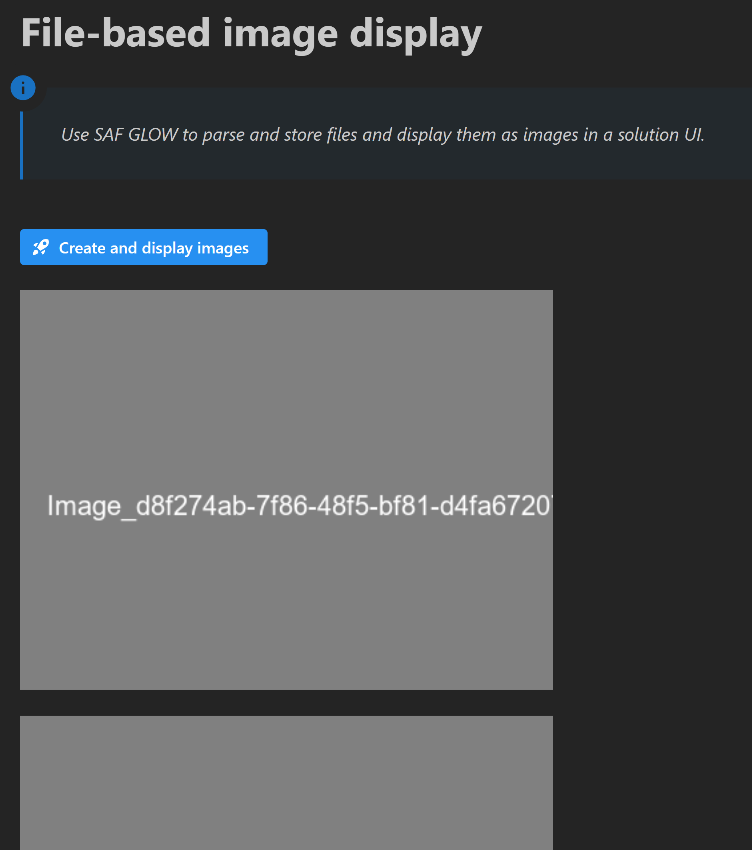
When you complete this example, you can expect the following output in the solution UI:
Prerequisites#
To mimic the creation of files, you need the pillow Python imaging library. Install the library using the following command:
poetry add pillow
Coding#
To display images from files stored in your solution, work through the following sequence of sections.
Backend#
Create the solution definition.
Key concept — Typed field
A field is a class attribute with a type annotation and a default value. A field
annotated with list[EntityHandle] references a list of blobs: the images are not
stored in the field itself, only the handles that point to them.
Define the step field
Declare a result_files field to hold the handle of each generated image.
result_files: list[EntityHandle] = []
Key concept — Transaction method
A transaction method is the only place where step fields are read and written. Any
method that touches a field must be decorated with @transaction, which declares the
fields it downloads (reads) and uploads (writes) through its StepSpec.
Add a transaction method to create the images
The create_images transaction method mimics an automated workflow: it generates three
PNG files with the pillow library in the storage root of the step, stores each of them
through self.storage_scope.store(), and collects the returned handles in the
result_files field.
@transaction(self=StepSpec(upload=["result_files"]))
def create_images(self) -> None:
    """
    Mimic the creation of 3 png files by using the pillow library.

    The images are written in the storage root of the step and their handles are
    stored in the ``result_files`` field.
    """
    images_path = self.storage_scope.get_storage_root() / "images"
    images_path.mkdir()

    self.result_files = []
    for _ in range(3):
        image_name = f"Image_{str(uuid4())}.png"
        image_path = images_path / image_name
        image_with_background = Image.new("RGB", (400, 300), "grey")
        ImageDraw.Draw(image_with_background).text(  # pyright: ignore[reportUnknownMemberType]
            (20, 150), image_name, font=ImageFont.truetype("arial.ttf", size=20)
        )
        image_with_background.save(image_path)
        image_handle = self.storage_scope.store(image_path)
        self.result_files.append(image_handle)
Frontend#
Expose the solution definition in the UI.
Define the page layout
In the ui/pages folder, the layout function of the page creates the
Create and display images button and a div named result-images that holds
the images to display. Its children are built by the create_image_div function.
def layout(project: ExamplesSolution) -> html.Div:
    """Layout of the display_images step UI."""
    return html.Div(
        [
            html.H1(
                "File-based image display", className="display-3", style={"font-size": "40px", "font-weight": "bold"}
            ),
            dmc.Blockquote(
                "Use SAF GLOW to parse and store files and display them as images in a solution UI.",
                icon=DashIconify(icon="material-symbols:info", width=30),
                style={"font-size": "18px", "fontStyle": "italic"},
            ),
            html.Br(),
            html.Br(),
            dmc.Button(
                "Create and display images",
                id="create-and-display-images",
                variant="filled",
                radius="sm",
                style={"font-size": "16px", "background-color": "#2790F1"},
                leftSection=DashIconify(icon="streamline:startup-solid"),
            ),
            html.Br(),
            html.Br(),
            html.Div(id="result-images", children=create_image_div(project)),
        ],
        style={"paddingLeft": "20px"},
    )
Key concept — Callback
A callback is a Dash-decorated function that fires in response to a UI event. In a
SAF solution, callbacks reach the backend through project.steps.<step_name>, read or
write fields, and invoke transaction methods. No manual HTTP calls are needed.
Trigger the image creation from the frontend
Write a callback that invokes the create_images transaction method when the button is
clicked, then rebuilds the content of the result-images div with the newly created images.
@callback(
    Output("result-images", "children"),
    Input("create-and-display-images", "n_clicks"),
    State("url", "pathname"),
    prevent_initial_call=True,
)
def create_images(n_clicks: int, project: ExamplesSolution) -> list[Any]:
    """Display images through callback."""
    step = project.steps.basic_step
    step.create_images()
    image_div_children = create_image_div(project)
    return image_div_children
Key concept — File URL
The browser cannot read a blob from its path. Call get_data with
substitute_file_handles_with_urls=True to retrieve a field whose entity handles are
replaced by URLs that the browser can fetch.
Render the images
The create_image_div function reads the result_files field as a list of URLs and wraps
each of them in an html.Img component. A timestamp is appended to every URL so that the
browser does not serve a cached version of a previously generated image.
def create_image_div(project: ExamplesSolution) -> list[Any]:
    """Create image div."""
    all_images: list[Any] = []
    step = project.steps.basic_step
    for image_url in step.get_data("result_files", substitute_file_handles_with_urls=True):
        # Adding a timestamp to the image URL to prevent browser caching issues
        all_images += [
            html.Div(html.Img(src=f"{image_url}?t={int(time.time())}", height="400px"), style={"flex": "1"}),
            dmc.Space(h=20),
        ]

    return all_images
Now that your implementation is complete, continue to the Testing section.
Testing#
Finally, test your implementation to confirm it works as expected.
Run the solution and compare your results with the results shown in the Feature highlight section.