

Environment variables#
Alongside the command-line interface (SAF CLI) parameters, SAF supports configuration through the use of environment variables. Solutions can be configured using multiple methods; when multiple methods are used, SAF resolves conflicts based on a defined order of precedence.
Configuration methods#
You can use either SAF CLI or Solutions Manager to configure the solution using SAFCLI parameters, system environment variables, or an environment file. The following sections describe each method.
CLI parameters#
SAF CLI parameters are configuration options passed directly via the command-line interface when launching the solution. You can use these to configure the solution only if you are using SAF CLI.
my_solution api --port 50002 --host 0.0.0.0
Environment variables#
System environment variables are set in your shell or system configuration. You can configure the solution with these using either SAF CLI or Solutions Manager.
Set environment variables using SAF CLI:
$env:GLOW_API_PORT = "50001" $env:GLOW_API_HOST = "0.0.0.0"export GLOW_API_PORT=50001 export GLOW_API_HOST=0.0.0.0
Set environment variables using Solutions Manager:
Open Visual Studio Code.
In the Activity Bar, click the Run Solution icon.
Under Solution environment, click the Configure solution environment.
The SAF Environment Configuration interface opens in the editor. Environment settings are divided into categories.
Find the environment variable you want to set:
Use the search bar to search for a specific environment variable.
Expand the Filter by category and select a category.
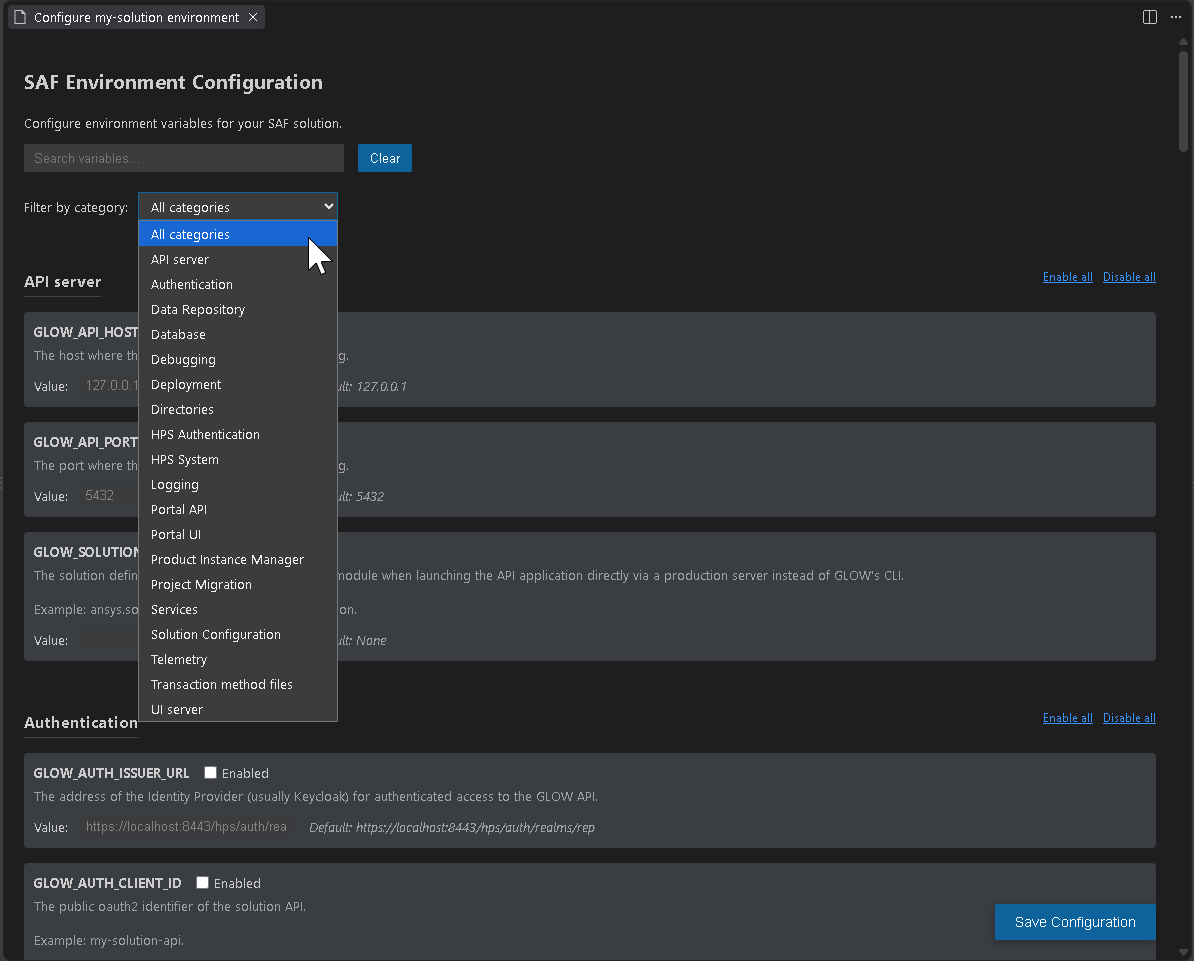
Modify the configuration parameters as needed:
Select or deselect the check box to enable or disable an environment variable.
Once an environment variable is enabled, you can modify its value in the Value field, either by selecting from a drop-down list or by entering a value.
Click the Enable all or Disable all button to quickly enable or disable all environment variables in the selected category.
Click the Save configuration button to save your changes.
The configuration is saved in a
.envfile in the solution’s root directory. When the solution is launched from Solutions Manager, it will use the saved configuration file.Close the editor page to exit the SAF Environment Configuration interface.
Environment file#
An environment file (.env) contains key-value pairs for configuration variables. By default, the file is loaded from your current working directory.
You can configure the solution with this file using either SAF CLI or Solutions Manager.
Use the --env-file SAF CLI parameter to specify a custom location:
# .env file
GLOW_API_PORT=50000
GLOW_API_HOST=127.0.0.1
GLOW_DEBUG=True
To use a custom environment file:
my_solution api --env-file /path/to/custom.env
When the solution is launched from SAF CLI, it will use the selected environment configuration file.
Select an environment file using Solutions Manager:
Open Visual Studio Code.
In the Activity Bar, click the Run Solution icon.
Under Solution environment, click the button next to the Select an environment file search bar, then browse to and select the
.envfile you want to use.Alternatively, enter the path to the
.envfile directly in the search bar.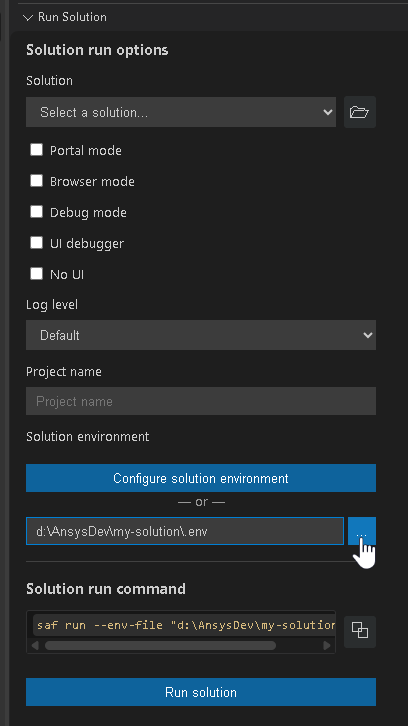
When the solution is launched from Solutions Manager, it will use the selected environment configuration file.
Order of precedence#
When multiple configuration methods are used, SAF resolves conflicts based on a defined order of precedence. This ensures that the most specific configuration takes priority over more general settings. Configuration values follow a standard precedence hierarchy, from highest to lowest:
CLI parameters (highest precedence):
Command-line arguments override all other configuration sources.
Environment variables:
System environment variables override values from the environment file.
Environment file (lowest precedence):
Values from the environment file (
.env) are used if not specified elsewhere.
Order of precedence example#
Consider the configuration for the GLOW_API_PORT setting:
If you define
GLOW_API_PORT=50000in your.envfile, the value is used as the base configuration.If you set the environment variable before execution, as shown below, the environment variable value (
50001) overrides the.envfile value:$env:GLOW_API_PORT = "50001"
export GLOW_API_PORT=50001
If you provide a SAF CLI parameter during execution, as shown below, the SAFCLI parameter value (
50002) takes precedence over both the environment variable and the.envfile:my_solution api --port 50002
See also
Variables that accept a Boolean value accept the values documented in the Types/booleans section of the official Pydantic documentation.
Configuration environment variables#
The environment variables used to configure SAF are listed below. The default values are provided for reference, but they may vary based on the solution and deployment context.
Deployment#
Variable |
Description |
Default values |
|---|---|---|
|
Specifies the deployment where SAF GLOW Engine runs. |
Permitted values:
|
API server#
Variable |
Description |
Default values |
|---|---|---|
|
Specifies the host where the solution API server runs. |
|
|
Specifies the port where the solution API server runs. |
|
|
Specifies the solution definition module to use when launching the API application directly via a production server instead of SAF GLOW Engine’s CLI. Example: |
Auto-discovered (varies by solution) |
UI server#
Variable |
Description |
Default values |
|---|---|---|
|
Specifies the host where the solution UI server runs. |
|
|
Specifies the port where the solution UI server runs. |
|
|
Specifies the URL of the solution API server. |
|
|
Specifies the URL of the GLOW API server in a form accessible to the user machine (for example,
|
The value of |
|
Specifies the URL of the Portal server. |
|
|
Specifies the absolute path to the project files directory that is shared with the GLOW API server in a form accessible to the UI server, for deployments where the UI server runs on a different system than the GLOW API server. |
|
|
Specifies the URL of the GLOW API server in a form accessible to the host machine (for example,
|
Resolved from the |
|
Specifies the number of available GraphQL clients that can be used concurrently. (DashClient is using GraphQL internally to communicate with the GLOW API. Therefore, a small pool size may impact the performance for a solution used by many concurrent users.) |
|
|
Specifies the module containing the UI’s Dash application. Used to specify the module when launching the UI application directly via a production server instead of GLOW’s CLI. Example: |
BDM Python API#
Variable |
Description |
Default values |
|---|---|---|
|
Disables BDM Python API garbage collection when set to |
|
Product Instance Manager#
Variable |
Description |
Default values |
|---|---|---|
|
Specifies the Product Instance Manager system to be used. |
Permitted values:
|
|
Specifies the host where the Product Instance Manager system runs. |
|
|
Specifies the port where the Product Instance Manager system runs. |
|
|
Specifies the path to the UNIX socket file used by PIM Light Server. Required to connect to PIM Light Server on Linux when |
|
|
Specifies the host where the product is running (not the manager system).
|
|
|
Sets the TCP host or IP address where the product instance listens for connections. (Not to be confused with the
|
|
|
Specifies the absolute path to the project files directory shared with the GLOW API server in a form accessible to the product when the Product Instance Manager system runs on a different system. |
|
|
Specifies the platform where the Product Instance Manager system runs when it is on a different system than the GLOW API server. Permitted values:
|
|
|
Specifies the path to the directory where the gRPC certificates used by PIM Light Server are stored. These certificates are required to connect to PIM Light Server
when |
|
|
Timeout in seconds for requests to managing the OptiSLang server instance. |
|
|
Timeout in seconds for requests to managing the Visor server instance. |
|
HPS system for job and parametric study submission#
Variable |
Description |
Default values |
|---|---|---|
|
Sets the host where the HPS system runs. |
|
|
Sets the port where the HPS system listens. |
|
Note
If the noted pair of values are not present, then the HPS system for job and parametric will be the one configured to be the product instance manager system if it is a HPS system. See the section on configuring the product instance manager system.
Authentication#
Variable |
Description |
Default values |
|---|---|---|
|
Specifies the address of the Identity Provider (usually Keycloak) for authenticated access to the GLOW API. Example: |
|
|
Specifies the public oauth2 identifier of the solution API. Example: |
|
|
Disables API authorization when set to |
|
|
Provides the API key for authenticating local requests to the API server. When set, requests originating from Mutually exclusive with |
|
|
Provides the absolute path to a file containing the API key for authenticating local requests to the API server. The path must be absolute and the file must exist. Mutually exclusive with |
|
HPS authentication#
Variable |
Description |
Default values |
|---|---|---|
|
Specifies the client ID of the HPS system in Keycloak for Keycloak-based authentication. Example: |
|
|
Specifies the username to log in to the HPS system for username/password authentication. Example: |
|
|
Specifies the password to log in to the HPS system for username/password authentication. Example: |
|
Note
If both types of HPS authentication are configured, Keycloak-based has priority.
Solution configuration#
Variable |
Description |
Default values |
|---|---|---|
|
Specifies whether to allow overwriting of the persisted solution configuration when there is a version update. |
|
Directories#
Variable |
Description |
Default values |
|---|---|---|
|
Specifies the full OS file system path to the directory for storing the project files. |
|
Transaction method child processes#
Variable |
Description |
Default values |
|---|---|---|
|
Specifies whether to automatically kill child processes spawned by a long-running transaction method after it completes. For more information, see Child process cleanup. |
|
Database#
Variable |
Description |
Default values |
|---|---|---|
|
Specifies the type of database to be used. |
Permitted values:
|
|
Specifies the location of the database. Can be a file path (for |
|
Data repository#
Variable |
Description |
Default values |
|---|---|---|
|
Specifies the type of data repository to be used. Permitted values:
|
|
|
Specifies the absolute path in the data repository to which a relative upload path is appended when uploading data. If the upload path is an absolute path, the upload path is used. |
|
Project migration#
Variable |
Description |
Default values |
|---|---|---|
|
Enables automatic project migration when set to This environment variable should only be enabled for development, never in a production environment. |
|
Logging#
Variable |
Description |
Default values |
|---|---|---|
|
Specifies whether to log to files under This option is mutually exclusive with |
|
|
Specifies the full OS file system path to the |
|
|
Specifies the full OS file system path to the |
|
|
Specifies the full OS file system path to the |
|
|
Specifies the logging level for Overwrites values from log configurations. |
|
Telemetry#
Variable |
Description |
Default values |
|---|---|---|
|
Specifies the endpoint for the OTLP exporters (traces, logs, and metrics). Non-URL values enable export to process output. |
|
Debugging#
Variable |
Description |
Default values |
|---|---|---|
|
Specifies whether debugging in SAF GLOW Engine is enabled. |
|
|
Enables API hot reload when set to Only works if debug mode is activated. |
|
|
Sets the directory that SAF GLOW Engine monitors for changes when API hot reload is enabled. For solutions generated with SAF CLI, the default behavior prevents unnecessary API server reloads when only UI files are modified. |
If the module location can be resolved, that directory is used; otherwise, the current working directory is used. |
|
Enables Python debugging in the GLOW UI. Setting it to |
|
|
Specifies the Python debugger port for the GLOW API service. |
|
|
Specifies the Python debugger port for the GLOW UI service. |
|
Note
Debugging works only when the solution is executed via SAF GLOW Engine’s CLI, not when it is executed using a production server.
Events#
Variable |
Description |
Default values |
|---|---|---|
|
Sets the interval, in seconds, in the event transmission loop for a websocket connection. Each iteration of the loop queries the database for new events and transmits those events via the websocket.
If a solution raises events in a transaction method and consumes them via web sockets, then:
|
|
Portal API#
Variable |
Description |
Default values |
|---|---|---|
|
Specifies the API version of SAF Portal used to communicate with it. |
|
Services#
Variable |
Description |
Default values |
|---|---|---|
|
Sets the maximum time, in seconds, to wait for a service (for example, API, UI, Portal, or PIM) to become healthy after it has been started. |
|