

Typing#
Just modern Python#
The GLOW API uses Python type annotation to enhance your experience of developing solutions in interactive development environments like Visual Studio Code. In addition, this enables you to use (if you want to) type checking tools to check you are using types consistently across your solution.
Don’t panic—it’s all based on standard Python 3.7 (and above) type declarations (thanks to Pydantic). No new syntax to learn. Just standard modern Python.
You write standard Python with types:
src/ansys/solutions/my_solution/solution/first_step.py#from ansys.saf.glow.solution import StepModel, StepSpec, transaction
class FirstStep(StepModel):
"""Step definition of the first step."""
# Declare variables as a float
# and get editor support when using them
first_arg: float = 0
second_arg: float = 0
result: float = 0
That can then be used like:
src/ansys/solutions/my_solution/solution/first_step.py#@transaction(self=StepSpec(upload=["result"], download=["first_arg", "second_arg"]))
def calculate(self) -> None:
"""Method to compute the sum of two numbers."""
self.result = self.first_arg + self.second_arg
Editor support#
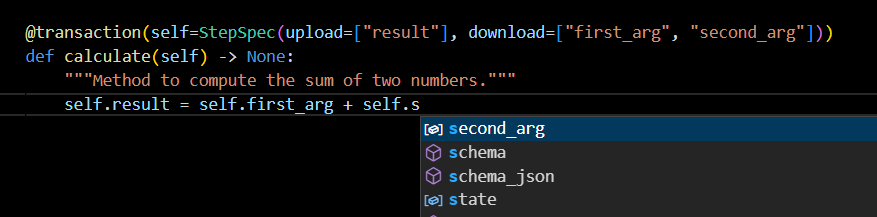
Autocompletion functionality within an editor is one of the most used typing features. The whole SAF GLOW Engine framework is designed with this in mind.
Here’s how your editor might help you:
Validation#
Validation for Python data types, including:
JSON objects (
dict).JSON array (
list) defining item types.String (
str) fields, defining min and max lengths.Numbers (
int,float) with min and max values, etc.
Validation for GLOW types, including:
Solution.StepModel,StepSpec.…and others.
All the validation is handled by the well-established and robust Pydantic tool.
Pydantic features#
SAF GLOW Engine is fully compatible with Pydantic. Any additional Pydantic code you have will also work.
This also means that custom types created within a solution are automatically validated.
With GLOW you get all of Pydantic’s features (as GLOW is based on Pydantic for all the data handling):
No new schema definition micro-language to learn.
If you know Python types, you know how to use Pydantic.
Plays nicely with your IDE/linter/brain, because Pydantic data structures are just instances of classes you define. Auto-completion, linting,
mypy, and your intuition should all work properly with your validated data.Validate complex structures:
Use of hierarchical Pydantic models, Python
typing’sListandDict, etc.Validatorsallow complex data schemas to be clearly and easily defined, checked, and documented as JSON Schema.You can have deeply nested JSON objects and have them all validated and annotated.
Extensible:
Pydantic allows you to define custom data types or extend validation with methods on a model decorated with the
validatordecorator.
Static type checking#
Pyright is a static type checker for Python. It can help you to improve the quality of your code by identifying and preventing errors, such as type errors, undefined variables, and unused imports. Pyright can also help you to write more idiomatic and efficient code.
Add pyright to your solution#
This section describes how to add pyright to your solution’s dependencies, how to configure it, and how to run it from your terminal.
Run the
setup_environment.pyvirtual environment installation script:python setup_environment.py -d all
Activate the virtual environment:
source .venv/bin/activate
.venv\Scripts\activate.bat
.venv\Scripts\Activate.ps1
In your solution’s
pyproject.tomlfile, create an optional dependency group calledstyleand add apyrightdependency:pyproject.toml## Optional styling requirements [tool.poetry.group.style] optional = true [tool.poetry.group.style.dependencies] pyright = "1.1.327"
In your solution’s
pyproject.tomlfile, add thepyrightconfiguration as shown below. You need to substitute the name of your solution module formy_solution:pyproject.toml#[tool.pyright] extraPaths = ["src"] include = [ "src/ansys/solutions/my_solution", "tests" ] exclude = [ "**/*_pb2.py", "**/*_pb2_grpc.py", ".venv", "**/.venv", ".poetry", ".tox", ".git", "setup_environment.py", "conf.py" ] strict = [ "src/ansys/solutions/my_solution", "tests" ] venvPath = "." venv = ".venv"
Update dependencies in the
poetry.lockfile:poetry lockInstall the newly added dependencies:
poetry install --with style
Run
pyright:pyright