

DAG design#
SAF builds a Directed Acyclic Graph (DAG) from StepSpec declarations. Understanding
how the DAG works is key to designing efficient, predictable solutions.
How the DAG works#
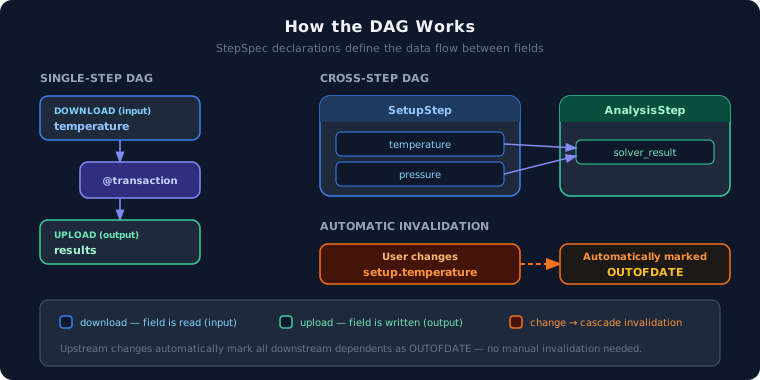
Each @transaction declares which fields it reads (download) and writes
(upload). GLOW uses these declarations to build a dependency graph:
downloadfields are upstream (inputs).uploadfields are downstream (outputs).When an upstream field changes, all downstream dependents are automatically marked
OUTOFDATE.
temperature is read and results is written#@transaction(self=StepSpec(download=["temperature"], upload=["results"]))
def compute(self) -> None:
self.results = [self.temperature * 1.5]
analysis reads from setup## In AnalysisStep:
@transaction(
self=StepSpec(upload=["solver_result"]),
setup=StepSpec(download=["temperature", "pressure"]),
)
def solve(self, setup: SetupStep) -> None:
self.solver_result = setup.temperature * setup.pressure
In this example, if the user changes setup.temperature, the framework marks
analysis.solver_result as OUTOFDATE automatically.
Keep dependencies within a step#
When a transaction reads and writes fields on the same step, the DAG stays simple and self-contained. Prefer this pattern when the data does not need to flow across steps.
class BeamStep(StepModel):
    """All fields belong to the same concern."""

    length: float = 1.0
    load: float = 100.0
    deflection: float = 0.0

    @transaction(self=StepSpec(download=["length", "load"], upload=["deflection"]))
    def solve(self) -> None:
        self.deflection = (self.load * self.length**3) / (3 * 200e9)
Declare cross-step reads explicitly#
When data must flow between steps, declare the dependency explicitly via the
@transaction parameter list. Never access another step’s fields by importing
the step instance directly — GLOW cannot track implicit reads.
@transaction(
    self=StepSpec(upload=["summary"]),
    setup=StepSpec(download=["temperature"]),
    analysis=StepSpec(download=["solver_result"]),
)
def generate_summary(self, setup: SetupStep, analysis: AnalysisStep) -> None:
    self.summary = f"T={setup.temperature}, Result={analysis.solver_result}"
Keep the DAG shallow#
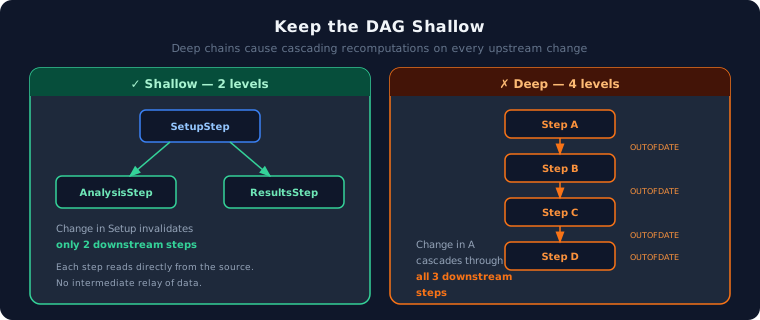
Deep dependency chains cause cascading recomputations: a single change at the top invalidates every step below it. Keep the DAG as flat as possible.
class AnalysisStep(StepModel):
    solver_result: float = 0.0

    @transaction(
        self=StepSpec(upload=["solver_result"]),
        setup=StepSpec(download=["temperature"]),
    )
    def solve(self, setup: SetupStep) -> None:
        self.solver_result = setup.temperature * 1.5


class ResultsStep(StepModel):
    report: str = ""

    @transaction(
        self=StepSpec(upload=["report"]),
        setup=StepSpec(download=["temperature"]),
    )
    def generate_report(self, setup: SetupStep) -> None:
        self.report = f"Report for T={setup.temperature}"
Sketch the DAG before coding#
Before writing any step code, draw the dependency graph on paper or a whiteboard. This helps you identify:
Which fields are shared between steps.
Where the deepest chains are.
Whether a step can be split or merged to simplify the graph.
SetupStep
├── temperature ──────► ThermalStep.heat_source
├── geometry    ──────► ThermalStep.mesh
└── geometry    ──────► StructuralStep.mesh

ThermalStep
└── temperature_field ─► StructuralStep.thermal_load

StructuralStep
└── stress_result      (terminal — no downstream)
Translating this sketch into StepSpec declarations makes the implementation
straightforward and the dependency graph predictable.