

File management#
A typical solution workflow is composed of the following distinct spaces:
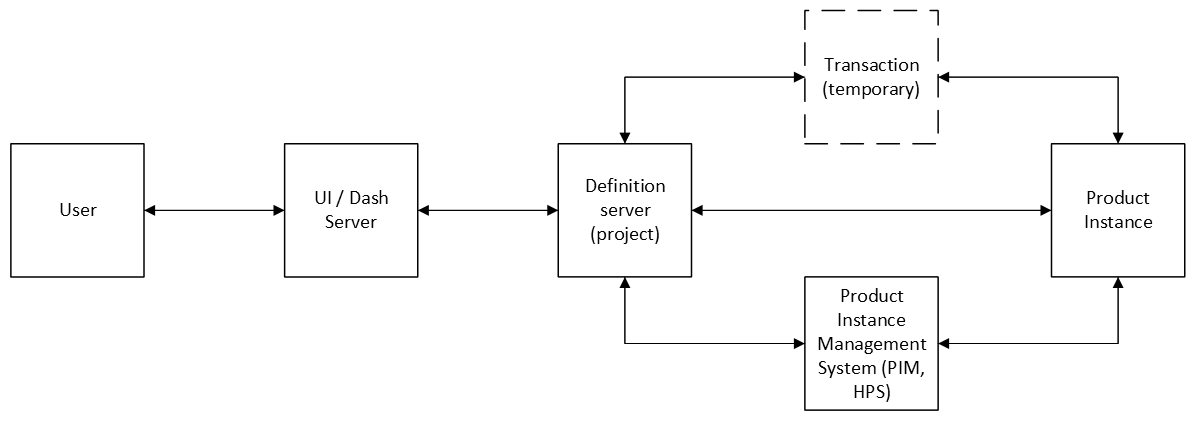
User space: where the User interacts with the Solution UI.
UI space: where the UI (for example, Dash) server is running.
Definition space: where the API server is running, containing the project files.
Method space: where a transaction is executed.
Product instance management space: where PIM or HPS is running.
Product space: where a product instance is running.
When developing or using a solution locally, it’s easy to mistakenly assume that all these spaces are the same. In a simple desktop deployment, everything runs on the same computer, allowing seamless interaction between all components without caring about their boundaries. However, these assumptions fall apart when the solution is deployed in non-trivial environments. For example:
A user interacts with a solution deployed on a remote server.
The UI and API are deployed in different containers.
The method space is within a container or in a different server than the product instance.
When using HPS, HPS might run on one server while the product instances are running on other servers or clusters.
When developing a solution, it is crucial to design it with the assumption that each space operates independently. Utilize the methods provided by GLOW to access files across these spaces. This approach ensures that your solution remains portable and adaptable to various deployment types and product instance management configurations without requiring changes.
Recommendations#
Follow the recommendations of your UI framework to move files from the user space to the UI space.
Use
FileReferenceandFileGroupReferencefor defining files in your steps.class MyStep(StepModel): my_file: FileReference = FileReference("my_file.txt") my_debug_files: FileGroupReference = FileGroupReference("debug_files/*.txt") simulation_output: FileReference = FileReference("simulation_output.json")
Use the
FileReferenceandFileGroupReferencemethods to move files from the UI space to the definition space. Example for Dash:@callback(State("url", "pathname"), prevent_initial_call=True) def write_my_file(pathname): project = DashClient[MySolution].get_project(pathname) # When the source is a file uploaded by the User using the Dash upload component project.steps.my_step.my_file.write_from_data_uri(file_data) # When the source is another file located in the Dash Server project.steps.my_step.my_file.write_from_file(file_in_ui_space) # When the source is a string project.steps.my_step.my_file.write_text(text_from_input_ui_field) @callback(Output("file_content", "children"), State("url", "pathname"), prevent_initial_call=True) def read_my_file(pathname): project = DashClient[MySolution].get_project(pathname) return project.steps.my_step.my_file.read_text()
Use
downloadanduploadfields in the transactionStepSpecto move files between the definition space (project) and method space.@transaction(self=StepSpec(download=["my_debug_files"], upload=["my_file"])) def group_debug_files(self) -> None: concatenated_debug = "" for debug_file in self.my_debug_files.list_files(): concatenated_debug += debug_file.read_text() self.my_file.write_text(concatenated_debug)
Use
product_manager.upload_file()andproduct_manager.download_file()to move files from method space to product space.@transaction(self=StepSpec(download=["input_model"], upload=["simulation_output"])) def solve_model(self, my_instance: MyProductInstance) -> None: # Upload from method space to product space self.my_instance.upload_file(self.input_model) # Assuming that the product client expects the absolute path as seen by the Product instance, # we must call self.my_instance.absolute_path to obtain the correct path. # For example, the product client might be running in a Linux container, so self.input_model # as seen by the client could be /projects/32435656/.-/my_step/my_instance/input_model.ext. # However, the product instance itself is running on a Windows host, so the path as seen by the product instance # could be C:/my_solution_files/projects/32435656/.-/my_step/my_instance/input_model.ext. abs_model_path_on_product = self.my_instance.absolute_path(self.input_model) # Assuming that this product creates a file simulation_output.json in the product space simulation_output = self.my_instance.instance.solve(abs_model_path_on_product) # Download file from product space to method space self.my_instance.download_file(self.simulation_output)
Note
When working with a product, it is essential to understand its client API and its manager:
Local path vs remote path: Determine whether the path provided to the client is local to the client or local to the product.
Path type: Identify if the path is absolute or relative.
Working directory: Confirm whether the product’s working directory is the same as the product space.
File lifetime: Consider whether the product will try to use the file after the transaction has finished.
Always try to use what the
FileReferenceandFileGroupReferenceclasses offer instead of trying to manually handling them via other Python libraries such asosorpathlib. For more information, see the GLOW API reference.@callback(State("url", "pathname"), prevent_initial_call=True) def check_my_file(pathname): project = DashClient[MySolution].get_project(pathname) # WRONG return (project_files_dir / parsed_relative_path_from_url).is_file() # CORRECT return project.steps.my_step.my_file.exists()
Common errors#
Passing a file in the method space to the product instance#
- Issues:
Assumes that the product has access to the method space.
Assumes that the product will not attempt to use the file once the transaction is complete.
This error may not be apparent if
GLOW_DEBUGis enabled, asGLOW_DEBUGprevents the deletion of the method space after the transaction finishes. However, onceGLOW_DEBUGis disabled, this error becomes evident.