

Product instance management#
This section covers how to launch, reuse, and shut down Ansys product instances from a SAF solution—and how to choose the right strategy for your deployment target.
The three-transaction lifecycle#
Every managed product instance follows a strict three-phase lifecycle: create, use, and shutdown. Each phase maps to a specific decorator combination.
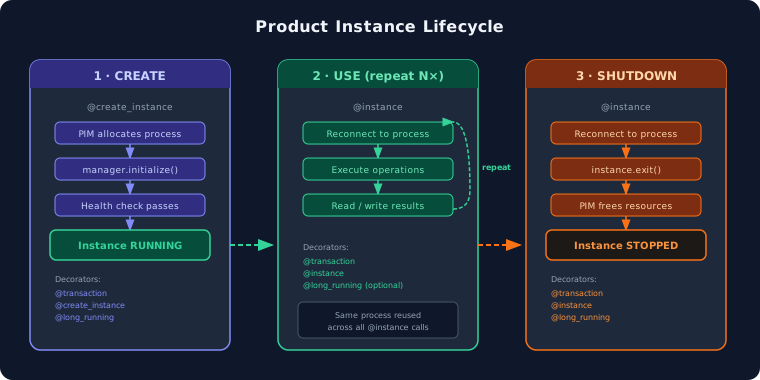
The @create_instance decorator launches the product process via PIM Light,
waits for its health check to pass, and injects the manager object into the
transaction method. Subsequent @instance calls reconnect to the same
running process. The shutdown transaction calls exit() and releases
resources.
@create_instance launches the product#@transaction(
self=StepSpec(download=["version"], upload=["instance_created"]),
enable_termination_event=True,
)
@create_instance("mechanical_instance", MechanicalSecureManager)
@long_running
def launch(self, mechanical_instance: MechanicalSecureManager) -> None:
"""Launch the Mechanical instance."""
mechanical_instance.initialize(version=self.version)
self.instance_created = True
@instance reconnects to the running product#@transaction(
self=StepSpec(download=["origin", "dimension"]),
enable_termination_event=True,
)
@instance("mechanical_instance")
@long_running
def add_geometry(self, mechanical_instance: MechanicalSecureManager) -> None:
"""Use the running Mechanical instance to add geometry."""
mechanical_instance.instance.modeler.create_rectangle(self.origin, self.dimension)
@instance with explicit cleanup#@transaction(self=StepSpec(upload=["instance_created"]))
@instance("mechanical_instance")
@long_running
def shutdown(self, mechanical_instance: MechanicalSecureManager) -> None:
"""Shut down the Mechanical instance."""
mechanical_instance.instance.exit()
self.instance_created = False
Always declare an instance_created field#
Every step that manages a product instance should declare a boolean
instance_created field (default False). Set it to True at the end
of the create transaction and back to False in the shutdown transaction.
This field serves two purposes:
UI feedback — the frontend can read the field to show whether the product is running and enable or disable action buttons accordingly.
Guard logic — other transactions can check the field before attempting to use the instance, avoiding errors when the product has not been started yet.
class SimulationStep(StepModel):
    """Step with explicit instance tracking."""

    instance_created: bool = False
    version: str = "251"

    @transaction(
        self=StepSpec(download=["version"], upload=["instance_created"]),
        enable_termination_event=True,
    )
    @create_instance("mechanical_instance", MechanicalSecureManager)
    @long_running
    def launch(self, mechanical_instance: MechanicalSecureManager) -> None:
        mechanical_instance.initialize(version=self.version)
        self.instance_created = True  # ← enables UI and guards

    @transaction(
        self=StepSpec(download=["instance_created"]),
        enable_termination_event=True,
    )
    @instance("mechanical_instance")
    @long_running
    def run_analysis(self, mechanical_instance: MechanicalSecureManager) -> None:
        if not self.instance_created:
            raise RuntimeError("Product not started — call launch() first.")
        # ... use mechanical_instance ...

    @transaction(self=StepSpec(upload=["instance_created"]))
    @instance("mechanical_instance")
    @long_running
    def shutdown(self, mechanical_instance: MechanicalSecureManager) -> None:
        mechanical_instance.instance.exit()
        self.instance_created = False  # ← disables UI and guards
PIM Light versus direct PyAnsys calls#
Two strategies exist for connecting to Ansys products from a transaction: PIM Light (managed instances) and direct PyAnsys calls (inline launch). Use PIM Light for any workflow that spans multiple transactions or needs GUI access.
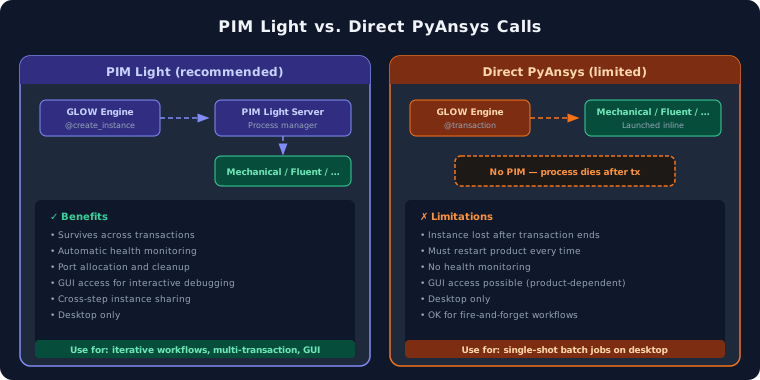
With PIM Light, the product process is launched once and survives across
transactions. SAF GLOW Engine reconnects to the same process every time @instance is
called. With direct calls, you launch the product inside a single transaction
and it is lost when the transaction ends.
from ansys.mapdl.core import launch_mapdl


class QuickSolveStep(StepModel):
    """Single-shot MAPDL solve — no PIM, no instance reuse."""

    result: float = 0.0

    @transaction(self=StepSpec(upload=["result"]))
    @long_running
    def solve(self) -> None:
        mapdl = launch_mapdl()  # Launched inline — dies when this method returns
        mapdl.prep7()
        # ... build model, solve ...
        self.result = float(mapdl.post_processing.nodal_displacement()[0])
        mapdl.exit()
Warning
Direct calls are acceptable only for desktop-only, single-transaction workflows. They are not portable to on-premises or cloud deployments and provide no health monitoring or cleanup guarantees.
Install PyAnsys SDKs via extras#
Product managers depend on specific PyAnsys SDK versions that are tested and
validated with the current SAF release. Always install them through the
ansys-saf-sdk extras — never pin an arbitrary PyAnsys SDK version manually.
# In your solution's pyproject.toml, add the product extras:
# ansys-saf-sdk = { version = "^0.2.0", extras = ["core-pim", "instance-management-mechanical"] }

# Or install interactively:
poetry add "ansys-saf-sdk[core-pim,instance-management-mechanical]"
Available extras match the supported product managers:
Note
Using the extras ensures that the PyAnsys SDK version is compatible with the SAF GLOW Engine version. Mixing arbitrary SDK versions can cause protocol mismatches or missing API methods.
Choose the right strategy#
The right instance strategy depends on where the solution will be deployed and whether the workflow is iterative (multiple transactions) or single-shot.
Strategy |
Deployment |
Use case |
Decorator pattern |
|---|---|---|---|
PIM Light |
Desktop, on-premises |
Iterative workflows, GUI access |
|
HPS |
Web, cloud, HPC |
Batch / parametric studies |
HPS job submission API |
Direct calls |
Desktop only |
Single-shot, fire-and-forget |
Inline |
For web and cloud deployments, use HPS job submission instead of PIM Light.
HPS offloads compute to scheduler-managed resources (SLURM, PBS, LSF) and
provides queue management, auto-scaling, and priority controls. SAF provides
step templates for both simple jobs and parametric studies — add them with
saf add-step.